The Idea #
I’ve always liked the idea of running my own Autonomous System (AS), get some v6 Provider Independent (PI) and maybe even v4. The requirement: no tunnels, no virtual routers. Real hardware.
Choosing hardware for the lab and Hobbynet #
The search started some time ago. I’ve been learning about hardware a lot due to personal interest and also because of my line-of-work; professionally my daily drivers are Juniper boxes with Trio or merchant silicon.
Understanding hardware level packet processing really helps in the context of knowing limitations and certain design choices - or how to choose the right hardware for a certain design. For the homelab / hobbynet I have been on the lookout for all kinds of different hardware. A lot has come across… Here is the shortlist:
DPDK Based / VPP #
Just grabbing a server, slap a proper NIC in there and you are basically golden. DPDK allows to bypass kernel and use userspace software to work with the NIC. So, with DPDK you can get pretty fast! VPP is working hard on getting some serious performance - 10 million PPS per CPU core isn’t that difficult. After looking in to such a solution, it wasn’t for me. VPP is making its way in to VyOS and i’ve tried playing with it there. Sadly could not get it to work. Many moving parts which I was not willing to learn at this moment. The technicalities are very interesting and I will be keeping an eye out for its development! For now it is not really checking the ‘appliance’-checkbox.
Arista #
Meanwhile I learned that Arista has some capable boxes too! The cheapest hardware box that is a ‘real’ router capable of pushing full-tables to FIB is an Arista DCS-7280R (with compression). I had someone lend me one to play with one for a while, thanks!
However, these run at 130 Watts - which is not bad given what it is capable of! But at 2k Euro’s they are not really cheap either. Sure, it’s Broadcom Jericho and real hardware - but a bit too much for a hobbynet. It might be a contender for later!
Juniper MX / ACX / NFX #
I would like this the most. The first real MX that does full tables in FIB is a MX204. Very capable hardware but waaay out of my league. Now, Juniper has ACX that use Jericho but only support FIB compression on newer ACX7000-series. And then you have to flex-license the box too. Nah, not for a hobbynet.
Eventually i’ve read about people getting the Juniper NFX250. Which is more like a virtualization host that can be an MX150 or vSRX. Could this mean I can have a Junos box that:
- Is an ‘appliance’
- Is under 1k Euros
- Can run Full tables
- Does not use 100kWh / month
- Performant enough?
ATT-NFX250-LS1 #
Turns out, they are dirt cheap! So why not get two of those?! Well really, these were AT&T’s re-branded units that are the lowest spec. So we will see what it is capable of. Got myself some matching DDR4 RAM to bump it up to 32GB per unit instead of 16GB. That should help a bit in RIB/FIB, maybe also with general performance.
NFX to MX #
The first one I’m going to rebrand to an MX150. Hardware wise it is almost the same box. The only real difference is CPU and RAM. With some tweaking you can remap the CPU’s so the vFPC VM starts, and you have a MX150. The Ip.Horse blog in reference [1] maps this out in great detail. First I will test this config and later on there will be some results.
NFX / vSRX #
The box obviously ships default with NFX software. You should upgrade it if you intend to use it as an NFX. This install is straight forward. The only issue is with AT&T specific models is that they load their own default configs. It looks like some kind of SD-WAN appliance.
Luckily no need for me to write all about fixing that issue. Ip.Horse has this set up as well for you [1] .
NFX Interface Layout #
Getting this thing up was not the most straight-forward thing for me. This platform was new to me as I’m daily driving ‘proper’ MX’s in my day-job.
The Juniper engineers chose for a very, very versatile setup. Utilizing x86 Open-vSwitch, DPDK and a broadcom switch-chip. This gives a lot of flexibility at a fraction of the hardware cost. Sadly, it seems Juniper is not really investing engineering effort in to vMX, but I can see why.
Thanks to Rewby to point out my flaw in the original diagram. Because i’m mapping the internal 10G directly to the vFPC, it looks like follows (simplified):
 ┌───────────────────────────────────────┌───────────────────────────────┐
 │          Physical                     │           Internals           │
 │  ┌─────────┐    ┌────────────┬──────┐ │   ┌───────┐     ┌──────────┐  │
 │  │ge-0/0/* ├───►│            │ sxe0 ┼─┼──►│ hsxe0 ├─────► ge-1/0/1 │  │
 │  └─────────┘    │  broadcom  └──────┘ │   └───────┘     └──────────┘  │
 │  ┌─────────┐    │  switch    ┌──────┐ │   ┌───────┐     ┌──────────┐  │
 │  │xe-0/0/* ├───►│            │ sxe1 ├─┼──►│ hsxe1 ├────►│ ge-1/0/2 │  │
 │  └─────────┘    └────────────┴──────┘ │   └───────┘     └──────────┘  │
 │                                       │  intel NIC      vFPC / vJunos │
 └───────────────────────────────────────┴───────────────────────────────┘
In NFX mode the hsxe0 and hsxe1 are passed to DPDK since I’m not planning on using any NFV’s/ Also putting it in to performance mode so it leverages the 2x10G internal NIC fully for the dataplane.
virtualization-options {
    interfaces ge-1/0/1 {
        mapping {
            interface hsxe0;
        }
    }
    interfaces ge-1/0/2 {
        mapping {
            interface hsxe1;
        }
    }
}
Assigning the DPDK interfaces as such in virtualization-options, plus having the vmhost mode in throughput. You can just lean on the default image for all the SRX stuff. The NFX image basically boots a vSRX/vJunos.
MX interfacing #
This particular config is not present on the MX150. It is simply just another layer of abstraction for you. But for understanding it is relevant to know how the NFX works.
A Real Juniper #
Based on the information earlier, I can describe this box with Juniper terminoligy: Open vSwitch is the ‘backplane’ or ‘switch fabric’ and the PFE is vFPC connected to OVS via DPDK to the PIC, the Broadcom switch. Almost like proper chassis, but with a virtual side. Hence the 20Gbit limitation of the MX150.
So, hypothetically if you keep L2 on the Broadcom you are not limited to the ‘DPDK backplane’ capacity. The Broadcom capacity in this model is not really documented. I’d guess its enough for line-rate L2 on its own.
Testing the MX150 #
To my knowledge there is only one blog that has some performance test of the NFX250 and those were just some iPerf tests. So I’m going to run TRex against it. I got myself a Mellanox ConnectX-4 card. Installed TRex on a VM, passed the PCI device. With two slight setbacks (personal reference material).
OFED #
You need the nVidia OFED driver. Just do it.
[linus-torvalds-flips-nvidia-off.jpg]
MTU issue #
Running in to this:
# ./t-rex-64 -i
Creating huge node
The ports are bound/configured.
Starting  TRex v3.08 please wait  ...
[ snip ]
mlx5_net: port 0 failed to set MTU to 65518 <<<<<<<<<<<<
ETHDEV: Port0 dev_configure = -22
EAL: Error - exiting with code: 1
Cannot configure device: err=-22, port=0
You need to add: port_mtu: 9000 like so (why no failsafe?):
- version: 2
  interfaces: ['00:10.0', '00:10.1']
  port_mtu: 9000
[omitted...]
Trex Physical Layout #
For visual thinkers. It’s a loop - nothing special.
 ┌─────────────────────────────────────────────┐
 │  ┌─────────────┐  MX /    ┌─────────────┐   │
 │  │  xe-0/0/12  │  NFX     │  xe-0/0/13  │   │
 │  └───▲──────┬──┘          └───▲──────┬──┘   │
 │      │      │                 │      │      │
 └──────┼──────┼─────────────────┼──────┼──────┘
        │      │                 │      │
 ┌──────┼──────┼─────────────────┼──────┼──────┐
 │  ┌───┼──────▼──┐  TRex    ┌───┴──────▼──┐   │
 │  │      0      │          │      1      │   │
 │  └─────────────┘          └─────────────┘   │
 └─────────────────────────────────────────────┘
One Million #
There is something funny going on. When I tested in MX mode, it looks like I’m getting maxed out at 1Mpps… No matter the size. Surely this is not the max?
This is testing ./stl/imix.py -m 530000pps
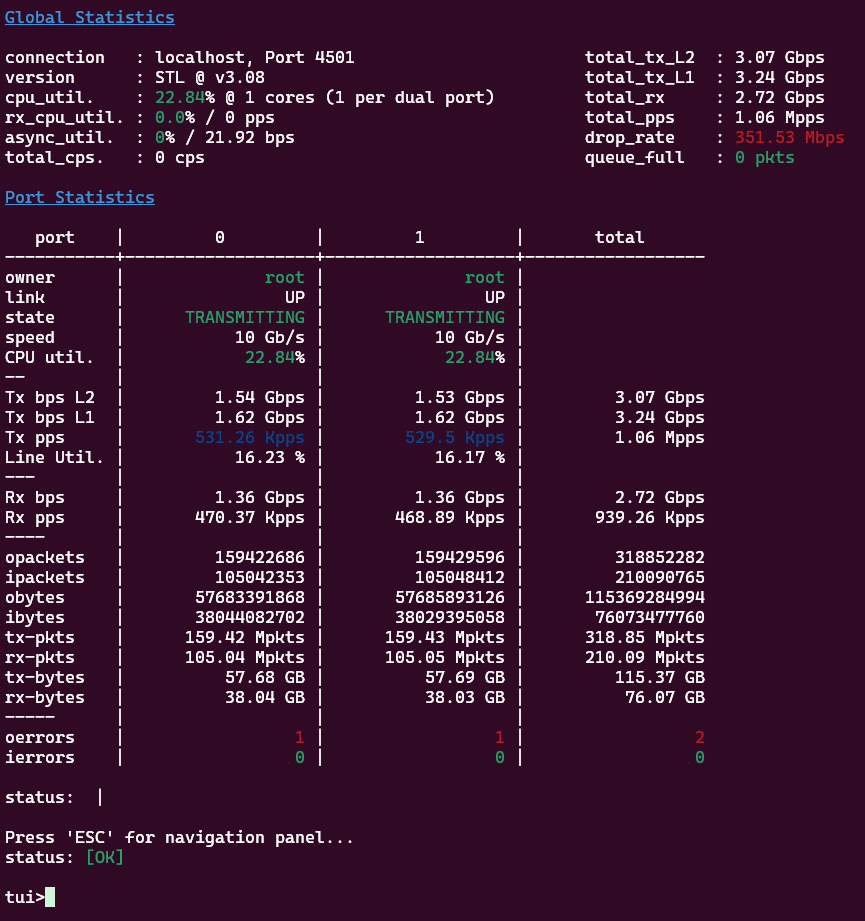
This post is long enough as an introduction, so I’ll cover full results, PPS limits, datapath analysis and performance tuning in Part Two.
References #
In no particular order: